debian 二則
A 刪錯文件,想用testdisk恢復,結果誤操作,生成log file還是image,把文件覆蓋了,just small case,一張生菜的照片而已
similar to this

B 由 debian 11 bullseye升級到 12 bookworm,gedit編緝 / etc/apt/sources.list 再apt-get update;apt-get upgrade;apt-get dist-upgrade
root@debian:~# cat /etc/os-release
PRETTY_NAME="Debian GNU/Linux 12 (bookworm)"
NAME="Debian GNU/Linux"
VERSION_ID="12"
VERSION="12 (bookworm)"
VERSION_CODENAME=bookworm
ID=debian
HOME_URL="https://www.debian.org/"
SUPPORT_URL="https://www.debian.org/support"
BUG_REPORT_URL="https://bugs.debian.org/"
root@debian:~# lsb_release
No LSB modules are available.
root@debian:~# u name -amr
Linux debian 6.1.0-15-amd64 #1 SMP PREEMPT_DYNAMIC Debian 6.1.66-1 (2023-12-09) x86_64 GNU/Linux
similar to this
B 由 debian 11 bullseye升級到 12 bookworm,gedit編緝 / etc/apt/sources.list 再apt-get update;apt-get upgrade;apt-get dist-upgrade
root@debian:~# cat /etc/os-release
PRETTY_NAME="Debian GNU/Linux 12 (bookworm)"
NAME="Debian GNU/Linux"
VERSION_ID="12"
VERSION="12 (bookworm)"
VERSION_CODENAME=bookworm
ID=debian
HOME_URL="https://www.debian.org/"
SUPPORT_URL="https://www.debian.org/support"
BUG_REPORT_URL="https://bugs.debian.org/"
root@debian:~# lsb_release
No LSB modules are available.
root@debian:~# u name -amr
Linux debian 6.1.0-15-amd64 #1 SMP PREEMPT_DYNAMIC Debian 6.1.66-1 (2023-12-09) x86_64 GNU/Linux
24 个评论

提示信息
网络连接异常
這玩意可太神了
网络连接异常
這玩意可太神了
泰國芒果乾,味道OK

zhihu有個user用freebsd
https://www.zhihu.com/question/597634467/answer/3006916092
你会以Ubuntu作为自己的日常办公系统吗? - 知乎
https://www.zhihu.com/question/597634467/answer/3006916092
你会以Ubuntu作为自己的日常办公系统吗? - 知乎
google-chrome-unstable在gnome wayland及 gnome on x.org顯示有問題,轉kde-plasma
======更新======
好像是adduser的問題?
======更新======
好像是adduser的問題?
cinnamon crashed and fell back to legacy mode while useing launcher


搞了我3天,玩死人了
https://www.reddit.com/r/kde/comments/qjc6su/removedisable_builtin_browser_of_kontactakregator/
https://www.whatsmybrowser.org/
Your full user agent string is:
Mozilla/5.0 (X11; Linux x86_64) AppleWebKit/537.36 (KHTML, like Gecko) Falkon/22.12.1 QtWebEngine/5.15.13 Chrome/87.0.4280.144 Safari/537.36
Your full user agent string is:
Mozilla/5.0 (X11; Linux x86_64) AppleWebKit/605.1.15 (KHTML, like Gecko) Version/17.0 Safari/605.1.15
非常明確地,falkon的qtwebengine=blink=google-chrome=chromium
epiphany(web)=khtml=webkit=safari,因為上面qtwebengine的command不適用
https://www.reddit.com/r/kde/comments/qjc6su/removedisable_builtin_browser_of_kontactakregator/
QTWEBENGINE_CHROMIUM_FLAGS=--blink-settings=forceDarkModeEnabled=true falkon
https://www.whatsmybrowser.org/
Your full user agent string is:
Mozilla/5.0 (X11; Linux x86_64) AppleWebKit/537.36 (KHTML, like Gecko) Falkon/22.12.1 QtWebEngine/5.15.13 Chrome/87.0.4280.144 Safari/537.36
Your full user agent string is:
Mozilla/5.0 (X11; Linux x86_64) AppleWebKit/605.1.15 (KHTML, like Gecko) Version/17.0 Safari/605.1.15
非常明確地,falkon的qtwebengine=blink=google-chrome=chromium
epiphany(web)=khtml=webkit=safari,因為上面qtwebengine的command不適用
雖然是blink layout (rendering) engine but 刻意模仿firefox,例如new private windows是shift alt p 而不是google-chrome的shift alt n
ctrl i view page info
F12 console
ctrl i view page info
F12 console
呃,bookmarks也是很典型仿firefox的,但不支援json
這智障玩意無法import bookmarks
這智障玩意無法import bookmarks
/home/debian/.waterfox
/home/debian/.mozilla/firefox
我都沒留意重複裝了好多個fx,2個waterfox,fx night x3,firefox-esr,共6個,看places.sqlite meganess / muchness
places.sqlite應該是用了lightweight的mysql / Maria's database,bookmarks檢索資料量太大了
/home/debian/.mozilla/firefox
我都沒留意重複裝了好多個fx,2個waterfox,fx night x3,firefox-esr,共6個,看places.sqlite meganess / muchness
places.sqlite應該是用了lightweight的mysql / Maria's database,bookmarks檢索資料量太大了

7d mango,好吃又便宜
這才發現這jb會set dark theme on falkon,沒仔細看她帖子。怎麼她不用nightly,用fx esr extended support release,stable repository的packaged softwares都是36個月前的老舊套件
https://upload.hkgolden.media/comment/jh4pp5ri.js35vlkepoj.3400nq3jzrk.2lg.jpg
https://upload.hkgolden.media/comment/jh4pp5ri.js35vlkepoj.3400nq3jzrk.2lg.jpg
她推介的floorp死活裝不上,要麼flatpak,要麼自己compile,太麻煩了,falkon apt-get install falkon裝上了,dark theme搞了我兩三天
首先要裝
https://store.kde.org/browse?cat=571&ord=latest
https://store.kde.org/p/1980818
這玩意是kde的,gnome用web (epiphany-browser),kde本來用khtml的konqueror和rekonq,現在轉qtblink的falkon,falkon基本上是模仿firefox (netscape navigator,ms-explorer的對手)
qtwebengine實際是qt版的blink,前身是webcore<webkit<khtml,源頭是kde的konqueror
首先要裝
https://store.kde.org/browse?cat=571&ord=latest
https://store.kde.org/p/1980818
這玩意是kde的,gnome用web (epiphany-browser),kde本來用khtml的konqueror和rekonq,現在轉qtblink的falkon,falkon基本上是模仿firefox (netscape navigator,ms-explorer的對手)
qtwebengine實際是qt版的blink,前身是webcore<webkit<khtml,源頭是kde的konqueror
falkon的adblock比較差,總體的體驗和chrome及fx差不多,大概是用qt toolbox寫blink,模仿firefox?


debian stable套件庫的套件太老舊了,unstable (sid) 進入testing最後進入stable,要36個月(3年)
以前用過debian sid及firefox,版本確實很新。當然我現在用的firefox nightly更新了,比stable release早兩個版本
https://wiki.debian.org/DebianEdu/roadmap
The goal for the DebianEdu project is to release Skolelinux at the same time as Debian. In general Debian is released every 18-24 month with security updates over a period of about 36 months after the release. Our experience is that the schools don't have the manpower to upgrade every year. A lifespan of 2-3 years is more suited for the system admins with scarce resources.
以前用過debian sid及firefox,版本確實很新。當然我現在用的firefox nightly更新了,比stable release早兩個版本
https://wiki.debian.org/DebianEdu/roadmap
The goal for the DebianEdu project is to release Skolelinux at the same time as Debian. In general Debian is released every 18-24 month with security updates over a period of about 36 months after the release. Our experience is that the schools don't have the manpower to upgrade every year. A lifespan of 2-3 years is more suited for the system admins with scarce resources.
kde-plasma on x.org不知為啥,cpu佔用率很高,還是轉回gnome on x
wayland無法用xrandr調節亮度,所以沒法用wayland,而且wayland bugs很多
xrandr --output HDMI-1 --brightness 0.65
wayland無法用xrandr調節亮度,所以沒法用wayland,而且wayland bugs很多
xrandr --output HDMI-1 --brightness 0.65
GNOME Flashback (Metacity)
 /opt/simplex/bin/simplex
/opt/microsoft/msedge-dev/
msedge
ln -s microsoft-edge-dev microsoft-edge
rm -rf '/home/debian/.config/vivaldi'
rm -rf /home/debian/.config/microsoft-edge
rm -rf /home/debian/.config/microsoft-edge-dev
/home/debian/.cache/chromium
/home/debian/.config/chromium
rm -rf /home/debian/.config/google-chrome
rm -rf /home/debian/.config/google-chrome-unstable
/opt/simplex/bin/simplex/opt/microsoft/msedge-dev/
msedge
ln -s microsoft-edge-dev microsoft-edge
rm -rf '/home/debian/.config/vivaldi'
rm -rf /home/debian/.config/microsoft-edge
rm -rf /home/debian/.config/microsoft-edge-dev
/home/debian/.cache/chromium
/home/debian/.config/chromium
rm -rf /home/debian/.config/google-chrome
rm -rf /home/debian/.config/google-chrome-unstable
真他媽見鬼了,裝了opensuse,可以啟用LUKS全盤加密,root partition可以選btrfs b tree fs,結果無法搞定中文輸入法
然後想回到debian,發現device mapper阻止我boot into debian,早上試試crypsetup luksClose
=======
居然是 /etc/fstab 的問題,難怪之前fedora / debian dual boot,debian無法啟動,update-grub / update-grub2都不行,一直以為是fedora + btrfs的問題
=====
apt .debs dependency hell,每次kde plasma升版本都卸載我所有des & dms
然後想回到debian,發現device mapper阻止我boot into debian,早上試試crypsetup luksClose
=======
居然是 /etc/fstab 的問題,難怪之前fedora / debian dual boot,debian無法啟動,update-grub / update-grub2都不行,一直以為是fedora + btrfs的問題
=====
apt .debs dependency hell,每次kde plasma升版本都卸載我所有des & dms
https://superuser.com/questions/1792067/cryptsetup-open-fails-with-correct-passphrase-no-key-available-with-this-pa
cryptsetup open /dev/sda4 decryptedblock
mount /dev/mapper/decryptedblock /mpt
umount /mpt
cryptsetup close decryptedblock
https://www.cyberciti.biz/hardware/cryptsetup-add-enable-luks-disk-encryption-keyfile-linux/
cryptsetup luksFormat /dev/sdxx
cryptsetup luksAddKey /dev/sdxx $pw
mkfs.btrfs /dev/mapper/decryptedblock
搞了一大輪才發現中文維基百科有介紹,而且命令很全,早知道直接看維基
加密lvm 10年前安裝debian時就看到,今天才知道咋實現,用AES256還是RSA算法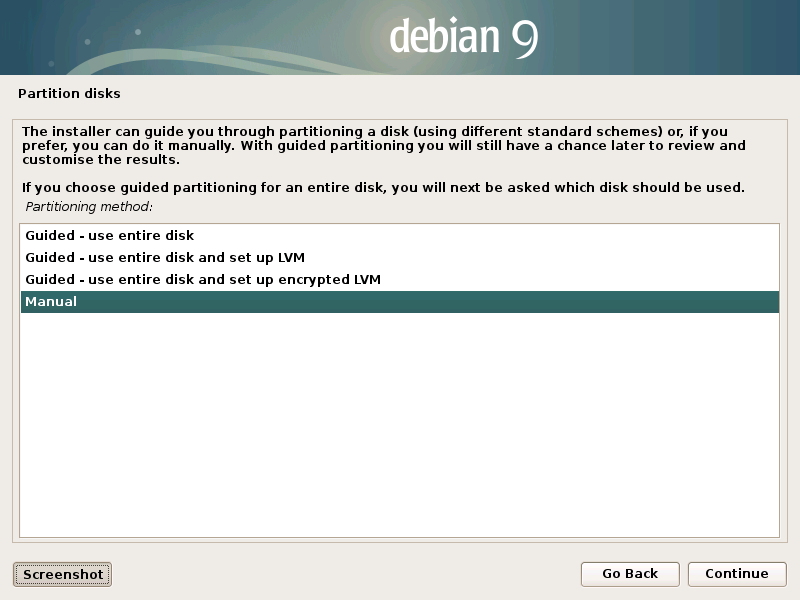
cryptsetup luksDump xxx
https://www.tecmint.com/wp-content/uploads/2019/06/dump-encryption-details.png
密碼強度
https://www.passwordmonster.com/
我搞了個一萬億年級別的pw
Time to crack your password:
1 trillion years
=========
400港幣買了隻出廠10年的6 TB HDD(二手),i/o r/w比我原有的8 TB靜,總感覺是datacenter用了十年。全新的6 TB HDD約800,便宜一半
回到家才說還有另一隻問我要不要
早幾日被kde的autosuspend if idle害了,今天又差點被gnome的autosuspend害了
之前裝openSUSE from network by netinst .iso幾次都OK,今天試了幾次都失敗,原來是image outdated
!6451875


除了blkid,還學會lsblk
debian outofthebox 開箱即用LUKS,BTRFS要裝btrfs-progs。而且debian對中文字體支持比openSUSE好。看起來字體有點不同。openSUSE的包名gnome-disk-utility和debian包名gnome-disks不同,gparted-pkexec、uget-gtk不詳
amule
gmrun
cryptsetup
btrfs-progs
fctix
fcitx5 ,這個和fcitx好像有矛盾
fcitx-tables-cangjie5
kde-full
falkon
cpufrequtils
feh
tint2
vlc
openbox screensaver ffmpeg smplayer pre-installed
從gip裏找到一個雜牌mouse,綫比舊時用的更長,手感更好。這玩意有30年歷史了,本來是親戚移民加拿大送給我的,在gip裏恆溫恆濕,沒有陽光直射,保存狀況完好
===========
/dev/sda gpt 4096 8TB 2 bad sectors
sda1 LUKS BTRFS /home
/dev/sdb gpt 4096 6TB
sdb1 vfat /boot/efi
sdb2 swap
sdb3 ext4 /
sdb4 LUKS BTRFS /
===========
hackintosh Ventura (13.0) for i7-4770看了下,太複雜,看不懂,放棄
freeBSD不能用grub啟動,手上沒有第三塊硬碟,放棄。也許將來5000元能買60TB HDD,將來再康康,即使128 parts,每個分割仍有約468.75GB
cryptsetup open /dev/sda4 decryptedblock
mount /dev/mapper/decryptedblock /mpt
umount /mpt
cryptsetup close decryptedblock
https://www.cyberciti.biz/hardware/cryptsetup-add-enable-luks-disk-encryption-keyfile-linux/
cryptsetup luksFormat /dev/sdxx
cryptsetup luksAddKey /dev/sdxx $pw
mkfs.btrfs /dev/mapper/decryptedblock
搞了一大輪才發現中文維基百科有介紹,而且命令很全,早知道直接看維基
加密lvm 10年前安裝debian時就看到,今天才知道咋實現,用AES256還是RSA算法
cryptsetup luksDump xxx
https://www.tecmint.com/wp-content/uploads/2019/06/dump-encryption-details.png
密碼強度
https://www.passwordmonster.com/
我搞了個一萬億年級別的pw
Time to crack your password:
1 trillion years
=========
400港幣買了隻出廠10年的6 TB HDD(二手),i/o r/w比我原有的8 TB靜,總感覺是datacenter用了十年。全新的6 TB HDD約800,便宜一半
回到家才說還有另一隻問我要不要
早幾日被kde的autosuspend if idle害了,今天又差點被gnome的autosuspend害了
之前裝openSUSE from network by netinst .iso幾次都OK,今天試了幾次都失敗,原來是image outdated
!6451875
除了blkid,還學會lsblk
debian outofthebox 開箱即用LUKS,BTRFS要裝btrfs-progs。而且debian對中文字體支持比openSUSE好。看起來字體有點不同。openSUSE的包名gnome-disk-utility和debian包名gnome-disks不同,gparted-pkexec、uget-gtk不詳
amule
gmrun
cryptsetup
btrfs-progs
fctix
fcitx5 ,這個和fcitx好像有矛盾
fcitx-tables-cangjie5
kde-full
falkon
cpufrequtils
feh
tint2
vlc
openbox screensaver ffmpeg smplayer pre-installed
從gip裏找到一個雜牌mouse,綫比舊時用的更長,手感更好。這玩意有30年歷史了,本來是親戚移民加拿大送給我的,在gip裏恆溫恆濕,沒有陽光直射,保存狀況完好
===========
/dev/sda gpt 4096 8TB 2 bad sectors
sda1 LUKS BTRFS /home
/dev/sdb gpt 4096 6TB
sdb1 vfat /boot/efi
sdb2 swap
sdb3 ext4 /
sdb4 LUKS BTRFS /
===========
hackintosh Ventura (13.0) for i7-4770看了下,太複雜,看不懂,放棄
freeBSD不能用grub啟動,手上沒有第三塊硬碟,放棄。也許將來5000元能買60TB HDD,將來再康康,即使128 parts,每個分割仍有約468.75GB


debian@debian:~$ screenfetch
_,met$$$$$gg. debian@debian
,g$$$$$$$$$$$$$$$P. OS: Debian 12 bookworm
,g$$P"" """Y$$.". Kernel: x86_64 Linux 6.1.0-18-amd64
,$$P' `$$$. Uptime: 3h 2m
',$$P ,ggs. `$$b: Packages: 3397
`d$$' ,$P"' . $$$ Shell: bash 5.2.15
$$P d$' , $$P Resolution: 1920x1080
$$: $$. - ,d$$' DE: GNOME 43.6
$$\; Y$b._ _,d$P' WM: Mutter
Y$$. `.`"Y$$$$P"' WM Theme:
`$$b "-.__ GTK Theme: Adwaita-dark [GTK2/3]
`Y$$ Icon Theme: breeze-dark
`Y$$. Font: Noto Sans, 10
`$$b. Disk: 4.6T / 13T (36%)
`Y$$b. CPU: Intel Core i7-4770 @ 8x 3.9GHz [73.0°C]
`"Y$b._ GPU: Mesa Intel(R) HD Graphics 4600 (HSW GT2)
`"""" RAM: 9062MiB / 15863MiB